There is simplest way of rooting your STOCK ICS. No worry about YELLOW Triangle or Binary counter.
You just need to go to this page and find your firmware version.
For example XXLRT look for LRT. Firmware DDLR9, look for LR9
It has two versions.
1. Stock Recovery mode (Volume UP + Home + Power button), download "ZIP" file
2. PC ODIN or Mobile ODIN mode, download ".tar.md5" file.
Note:
At the end of the process your GNote will be ROOTED + CWM installed.
Continue reading here

Showing posts with label ICS. Show all posts
Showing posts with label ICS. Show all posts
Sunday, October 07, 2012


Tuesday, September 18, 2012
UPDATE Galaxy Note to N7000XXLRT
UPDATE your Galaxy Note firmware to N7000XXLRT. No worry, it's NO WIPE
Device: Samsung Galaxy Note GT-N7000
Regions: Austria, Belgium, France, Germany, Hungary, Italy, Spain, United Kingdom
Product Code: GT-N7000ZBADBT
Latest firmware: N7000XXLRT/N7000DBTLRT/N7000XXLRK/N7000XXLRT
Version: Android 4.0.4 Ice Cream Sandwich
PDA: N7000XXLRT (Base Firmware)
CSC: N7000DBTLRT
Modem: N7000XXLRK
Build Date: 06-09-2012
Change-list: 1068447
Download here
What's new? I don't know....downloading it :)
How to Install?

1. Get ODIN for Desktop v1.87 and load TAR file. Leaked firmware will not give you Yellow Triangle.
2. Get your phone in DOWNLOAD MODE (HOME + Volume Down + Power Button)
3. Connect PHONE to your PC
4. Click START. Sit back and relax...

5. DONE!
 Stock N7000XXLRT.
 DONE ROOTED + BUSYBOX. Using SuperSU v0.95

Quadrant. Acceptable performance.
It's NO WIPE version.
Device: Samsung Galaxy Note GT-N7000
Regions: Austria, Belgium, France, Germany, Hungary, Italy, Spain, United Kingdom
Product Code: GT-N7000ZBADBT
Latest firmware: N7000XXLRT/N7000DBTLRT/N7000XXLRK/N7000XXLRT
Version: Android 4.0.4 Ice Cream Sandwich
PDA: N7000XXLRT (Base Firmware)
CSC: N7000DBTLRT
Modem: N7000XXLRK
Build Date: 06-09-2012
Change-list: 1068447
Download here
What's new? I don't know....downloading it :)
How to Install?

1. Get ODIN for Desktop v1.87 and load TAR file. Leaked firmware will not give you Yellow Triangle.
2. Get your phone in DOWNLOAD MODE (HOME + Volume Down + Power Button)
3. Connect PHONE to your PC
4. Click START. Sit back and relax...

5. DONE!


Quadrant. Acceptable performance.
It's NO WIPE version.
Tuesday, July 31, 2012
Download Area updated. Abyss Kernel 4.2
Why should I have Abyss?
-Developer have declare that with Abyss you are save to load custom ROM.
-Save to clear cache, dalvik and data
-Always keep Abyss inside your external SD card for future flashing
How to load Abyss
1. Inside CWM, load "AbyssNotekernel42CWTouchOriginalLogo.zip"
2. Go to Advanced
3. Reboot Recovery
4. You phone will reboot and your CWM will turn to touch base
5. You are on Abyss now
6. You can start load any ICS custom ROM now.
Download Abyss from our Download Area
-Developer have declare that with Abyss you are save to load custom ROM.
-Save to clear cache, dalvik and data
-Always keep Abyss inside your external SD card for future flashing
How to load Abyss
1. Inside CWM, load "AbyssNotekernel42CWTouchOriginalLogo.zip"
2. Go to Advanced
3. Reboot Recovery
4. You phone will reboot and your CWM will turn to touch base
5. You are on Abyss now
6. You can start load any ICS custom ROM now.
Download Abyss from our Download Area
Tuesday, July 10, 2012
SpeedMod N7000 ICS K3-7 CWM CIFS ROOT
You could see the different on your picture gallery. Sharper photo image.
K3-7:
- Changed to Linaro GCC 4.4 compiler for better stability
- Better MDNIE display settings to eliminate over-sharpening
 Kernel version. Speedmod k3-7
 Sharper home screen
 Image on Facebook
 Image on Google+
Black clipping reduced greatly. Try watch video clip below on your Galaxy Note.
Download SpeedMod here
How to install it?
1. You need to have MobileOdin (the easiest way)
 Open File. Select "speedmod-kernel-n7000-ics-k3-7-Odin.tar"
 Flash firmware. Auto re-start and you are done......
Note:
-I'm on stock ZSLPF+ROOTED
-No more WiFi problem
-Very stable and smooth
-Recommended to all stock + rooted user
Continue reading here and thanks to hardcore
K3-7:
- Changed to Linaro GCC 4.4 compiler for better stability
- Better MDNIE display settings to eliminate over-sharpening


Black clipping reduced greatly. Try watch video clip below on your Galaxy Note.
Download SpeedMod here
How to install it?
1. You need to have MobileOdin (the easiest way)


Note:
-I'm on stock ZSLPF+ROOTED
-No more WiFi problem
-Very stable and smooth
-Recommended to all stock + rooted user
Continue reading here and thanks to hardcore
Wednesday, June 13, 2012
How to ROOT Galaxy Note. ICS only!
How to root Galaxy Note? I have ICS stock. Currently I'm on ZSLPF.
How to ROOT (assumption you are on stock)
1. Download:
2. Reboot to recovery (Home + Volumne UP + Power button)
3. Choose apply update from external storage.
4. Choose CWM.zip and wait until CWM recovery appear (Touch base)
5. Choose install zip from sdcard or external SD
6. Choose and Install SU-Busybox-Installer.zip
7. Reboot. Done! Your device is ROOTED
Note:
-You might need to update superuser app from Google Play and its binary
I dont like ROOT. How to remove it?
1. Download:
2. Reboot to recovery (Home + Volumne UP + Power button)
3. Choose apply update from external storage.
4. Choose CWM.zip and wait until CWM recovery appear
5. Choose install zip from sdcard or external SD
6. Choose and Install SU-Installer-signed.zip
7. Reboot. Done! Your device is UN_ROOTED
What's the different? Look at STEP-6 properly.... just uninstall busybox ma.... :)
Note:
Many users claim it works on any ICS for the time being, even LQ3 (latest Baltic update)
How to ROOT (assumption you are on stock)
1. Download:
2. Reboot to recovery (Home + Volumne UP + Power button)
3. Choose apply update from external storage.
4. Choose CWM.zip and wait until CWM recovery appear (Touch base)
5. Choose install zip from sdcard or external SD
6. Choose and Install SU-Busybox-Installer.zip
7. Reboot. Done! Your device is ROOTED
Note:
-You might need to update superuser app from Google Play and its binary
I dont like ROOT. How to remove it?
1. Download:
2. Reboot to recovery (Home + Volumne UP + Power button)
3. Choose apply update from external storage.
4. Choose CWM.zip and wait until CWM recovery appear
5. Choose install zip from sdcard or external SD
6. Choose and Install SU-Installer-signed.zip
7. Reboot. Done! Your device is UN_ROOTED
What's the different? Look at STEP-6 properly.... just uninstall busybox ma.... :)
Note:
Many users claim it works on any ICS for the time being, even LQ3 (latest Baltic update)
Wednesday, May 23, 2012
How to set ICS Proxy
How to set ICS Proxy?
Not that difficult if you know where to click :)
 Click on Wi-Fi
 Click on your selected WIFI and hold. Select Modify network config.
 Check [Show advanced options]
 Tadaaaaaa.... put in your proxy server here.... you dont have to root to do this :)
Not that difficult if you know where to click :)


Tuesday, May 22, 2012
Galaxy Note ICS 4.0.3 Malaysia N7000DXLP9_N7000OLBLP6_N7000DXLP5
Galaxy Note Firmware Update ICS 4.0.3 Malaysia N7000DXLP9/N7000OLBLP6/N7000DXLP5/N7000DXLP9
Download Area 1
Base on CheckFus new firmware for Malaysia available for download

Download Area 2
Download N7000DXLP9_N7000OLBLP6_XME.zip (MALAYSIA) from Hotfile. Click here
Download Info
Product Code: GT-N7000ZBAXME
Latest firmware: N7000DXLP9/N7000OLBLP6/N7000DXLP5/N7000DXLP9
Modified: 14/5/2012 7:50:07 PM
Filename: GT-N7000_XME_1_20120514193709_vxgx7xhtll.zip.enc2
After extracting the ZIP file
1. N7000DXLP9_N7000OLBLP6_N7000DXLP5_HOME.tar.md5 959,863KB
2. SS_DL.dll 270KB
Note:
- Seems like we just need to load PDA only via PC ODIN!
-You will be stock. NO ROOT/CWM
-Load via Mobile Odin and check Everroot to maintain ROOT
How to Install it?
 1. Load using PC ODIN V1.87. Click image above for detail.
2. NO PIT means NO Re-Partition.
3. Make sure your phone in download mode (Home+Volumne Down+Power)
4. Connect Phone to Notebook USB.
5. Click Start. DONE
Note:
For MALAYSIAN guys who are having problem with WIFI and love local MODEM (Baseband version), you could load this with no worry.
Code Revision
N7000DXLP9
N7000(=model)DX(=Region)L(=Year)P(=Month)9(=Revision)
DX Indonesia, Malaysia, Philippines, Singapore, Vietnam
YEAR CODES
L 2012
MONTH CODES
L December. P???
P9
PF
PY
Base on the Samsung versioning code...is it meaning that Malaysia not soo latest code??
Summary
For me, adding new bootloader for new ICS would be better. It will replace GB bootloader. Install LPF version.
Download Area 1
Base on CheckFus new firmware for Malaysia available for download

Download Area 2
Download N7000DXLP9_N7000OLBLP6_XME.zip (MALAYSIA) from Hotfile. Click here
Download Info
Product Code: GT-N7000ZBAXME
Latest firmware: N7000DXLP9/N7000OLBLP6/N7000DXLP5/N7000DXLP9
Modified: 14/5/2012 7:50:07 PM
Filename: GT-N7000_XME_1_20120514193709_vxgx7xhtll.zip.enc2
After extracting the ZIP file
1. N7000DXLP9_N7000OLBLP6_N7000DXLP5_HOME.tar.md5 959,863KB
2. SS_DL.dll 270KB
Note:
- Seems like we just need to load PDA only via PC ODIN!
-You will be stock. NO ROOT/CWM
-Load via Mobile Odin and check Everroot to maintain ROOT
How to Install it?

2. NO PIT means NO Re-Partition.
3. Make sure your phone in download mode (Home+Volumne Down+Power)
4. Connect Phone to Notebook USB.
5. Click Start. DONE
Note:
For MALAYSIAN guys who are having problem with WIFI and love local MODEM (Baseband version), you could load this with no worry.
Code Revision
N7000DXLP9
N7000(=model)DX(=Region)L(=Year)P(=Month)9(=Revision)
DX Indonesia, Malaysia, Philippines, Singapore, Vietnam
YEAR CODES
L 2012
MONTH CODES
L December. P???
P9
PF
PY
Base on the Samsung versioning code...is it meaning that Malaysia not soo latest code??
Summary
For me, adding new bootloader for new ICS would be better. It will replace GB bootloader. Install LPF version.
Friday, May 18, 2012
How to ROOT N7000ZSLPF ICS 4.0.3
How to ROOT N7000ZSLPF ICS 4.0.3?
Root instruction
 **Mobile ODIN you need to install separately. Get if from Android Market/Google Play
With Mobile ODIN you could load CF-ROOT kernel.
Download CF-Root-SGN_ZS_OZS_LPF-v5.3-CWM5.zip
Note:
-Some user reported fail to connect to WIFI after loading CF-Root
-I do not load CF-ROOT since previous steps provide me root and CWM. That good enough
Continue reading here
Root instruction
- Download the Files first and put in your SDCARD [CWM zip][ SU-Busybox-Installer.zip]
- Reboot to recovery. (Home+Volume UP+Power button)
- Choose apply update from external storage. (use vol up/down to select, power to enter)
- Choose CWM.zip and wait until CWM recovery appear.
- Choose install zip from sdcard or external SD(Now use touch function to select choice)
- Choose and Install SU-Busybox-Installer.zip
- Reboot
- You are done and now your device is ROOTED

With Mobile ODIN you could load CF-ROOT kernel.
Download CF-Root-SGN_ZS_OZS_LPF-v5.3-CWM5.zip
Note:
-Some user reported fail to connect to WIFI after loading CF-Root
-I do not load CF-ROOT since previous steps provide me root and CWM. That good enough
Continue reading here
Thursday, May 17, 2012
Galaxy Note ICS 4.0.3 Taiwan N7000ZSLPF_N7000OZSLPF_OZS
More Android ICS for Galaxy Note coming
PDA: N7000ZSLPF
Modem: N7000XXLR1
CSC: N7000OZSLPF
Country/Carrier: Taiwan
Version: Android 4.0.3
Date: 15-05-2012
Should have most of the Asia Language.
Download N7000ZSLPF_N7000OZSLPF_OZS.zip here
Files inside ZIP:
How to install it?
1. Install it using PC Odin. If you inject ROOT with PC ODIN you might get Yellow Triangle
2. Install it using Mobile ODIN. If you have ROOT and would like to keep it, use Mobile Odin.
*Use mobile odin to flash and select the PDA, CSC and Kernel and the rest it will do the job
*CF-Root available. Download here

Note:
-It's FULL WIPE.
PDA: N7000ZSLPF
Modem: N7000XXLR1
CSC: N7000OZSLPF
Country/Carrier: Taiwan
Version: Android 4.0.3
Date: 15-05-2012
Should have most of the Asia Language.
Download N7000ZSLPF_N7000OZSLPF_OZS.zip here
Files inside ZIP:
- GT-N7000-MULTI-CSC-OZSLPF.tar.md5
- MODEM_N7000XXLR1_REV_05_CL1144476.tar.md5
- N7000_APBOOT_N7000ZSLPF_CL558430_REV02_user_low_sh ip.tar.md5 (**NEW BOOTLOADER)
- N7000_CODE_N7000ZSLPF_CL558430_REV02_user_low_ship .tar.md5
- Q1_20110914_16GB.pit
- Q1_20110914_32GB.pit
How to install it?
1. Install it using PC Odin. If you inject ROOT with PC ODIN you might get Yellow Triangle
2. Install it using Mobile ODIN. If you have ROOT and would like to keep it, use Mobile Odin.
*Use mobile odin to flash and select the PDA, CSC and Kernel and the rest it will do the job
*CF-Root available. Download here

Note:
-It's FULL WIPE.
Friday, May 11, 2012
Picasa unable to retrieve account information (Android 4.0.3)
Do you have problem with Picasa on your Android 4.03 phone? You are not able to share via Picasa? DO NOT factory reset your phone! Try out solution below first. It might help :)
 Picasa. Unable to select Album. Click Upload and failed. Try steps below.
 1. Go to your account and sync option in Settings
 2. Remove all others account and left your GMail account only!
3. Try Picasa share again. It should work. It's work for me.
Note:
You can start added others account back. If you are getting the problem again, means the new added account have problem (wait for Google Fix)


3. Try Picasa share again. It should work. It's work for me.
Note:
You can start added others account back. If you are getting the problem again, means the new added account have problem (wait for Google Fix)
Thursday, May 10, 2012
Galaxy Note ICS 4.0.3 Germany N7000XXLPY_N7000OXALPY_DBT.zip
Samsung released their first official Ice Cream Sandwich update for the Galaxy Note GT-N7000. This update runs Android 4.0.3
Download N7000XXLPY_N7000OXALPY_DBT.zip
At the moment only people from Germany with product code DBT could update their phones via Samsung KIES. Below are movies about the first official Ice Cream Sandwich firmware.
Firmware details:
Galaxy Note GT-N7000
N7000XXLPY 4.0.3 2012 May N7000OXALPY Open Germany
GT-N7000ZBADBT
CODE: N7000XXLPY
CSC: N7000OXALPY
MODEM: N7000XXLPT
Note:
-This is NON WIPE version
How to install it?
If you are from GB+Rooted, you need to have Mobile Odin
1. Download and extract N7000XXLPY_N7000OXALPY_DBT.zip
2. Copy Extracted file to your internal SD card

3. Download CF-Root-SGN_XX_OXA_LPY-v5.3-CWM5.zip
4. Extract CF root until you see the "zImage" file
5. Copy "zImage" file to your internal SD card
6. Open Mobile Odin
7. Select 'Open file' and point to ROM file "N7000XXLPY_N7000OXALPY_N7000XXLPT_HOME.tar.md5"
8. Select Kernel tab and point to "zImage" file

9. Select Ever Root option

10. Select Flash Firmware
Check MD5: YES
11. Sit back and relax....
Finally you will get ICS 4.0.3 + Root + CWM
Note:
- If you face any error after restart, just restart again into recovery and do factory reset
- In case you need to go to recovery mode, DO NOT enter Recovery via CWM apk you will softbricked.
- Enter recovery via Volume UP+Home+Power button
Relax....watching the video...this is what you will have :)
more relaxing...
Continue reading on XDA forum and here
Download N7000XXLPY_N7000OXALPY_DBT.zip
At the moment only people from Germany with product code DBT could update their phones via Samsung KIES. Below are movies about the first official Ice Cream Sandwich firmware.
Firmware details:
Galaxy Note GT-N7000
N7000XXLPY 4.0.3 2012 May N7000OXALPY Open Germany
GT-N7000ZBADBT
CODE: N7000XXLPY
CSC: N7000OXALPY
MODEM: N7000XXLPT
Note:
-This is NON WIPE version
How to install it?
If you are from GB+Rooted, you need to have Mobile Odin
1. Download and extract N7000XXLPY_N7000OXALPY_DBT.zip
2. Copy Extracted file to your internal SD card

3. Download CF-Root-SGN_XX_OXA_LPY-v5.3-CWM5.zip
4. Extract CF root until you see the "zImage" file
5. Copy "zImage" file to your internal SD card
6. Open Mobile Odin
7. Select 'Open file' and point to ROM file "N7000XXLPY_N7000OXALPY_N7000XXLPT_HOME.tar.md5"
8. Select Kernel tab and point to "zImage" file

9. Select Ever Root option

10. Select Flash Firmware
Check MD5: YES
11. Sit back and relax....
Finally you will get ICS 4.0.3 + Root + CWM
Note:
- If you face any error after restart, just restart again into recovery and do factory reset
- In case you need to go to recovery mode, DO NOT enter Recovery via CWM apk you will softbricked.
- Enter recovery via Volume UP+Home+Power button
Relax....watching the video...this is what you will have :)
more relaxing...
Continue reading on XDA forum and here
Tuesday, May 08, 2012
Ice Cream Sandwich on the AT&T Samsung Galaxy Note
Galaxy Note ICS with full of TouchWiz
Do you like it? ICS with full of TouchWiz.
Continue reading here
Do you like it? ICS with full of TouchWiz.
Continue reading here
Saturday, April 21, 2012
How to install ICS Stunner
How to install ICS Stunner on Galaxy Note N7000?
You are from Gingerbread with root. This is what you need:
1. ICS LP1 Repack I9220LP1-N7000-ICS-REPACK - Mobile Odin Pro/Mobile Odin Lite.


2. Once reboot. Clear Data/Factory Reset

3. Advance>Reboot Recovery. Then install ZIP files below
4. ICS Stunner - CWM Recovery
5. LP5 modem - CWM Recovery
6. Done
Note:
-Do not use LP5 repack
-LP6 modem avail on LP5 modem link
-Copy all the download files into your internal SD card
-No s-pen usage like stock

How to make screen shot on stunner?
Settings >Euphoria Control>Power Menu Options>Check Show screenshot
Hold Power Button and you will see ScreenShot option


ICS Stunner 1.4.19 Screens. Apps
 CWM avail.

 SuperSU. Means you are rooted!
Widgets


 Facebook with Arabic font.
You are from Gingerbread with root. This is what you need:
1. ICS LP1 Repack I9220LP1-N7000-ICS-REPACK - Mobile Odin Pro/Mobile Odin Lite.


Open file "I9220LP1-N7000-ICS-REPACK.tar"
2. Once reboot. Clear Data/Factory Reset
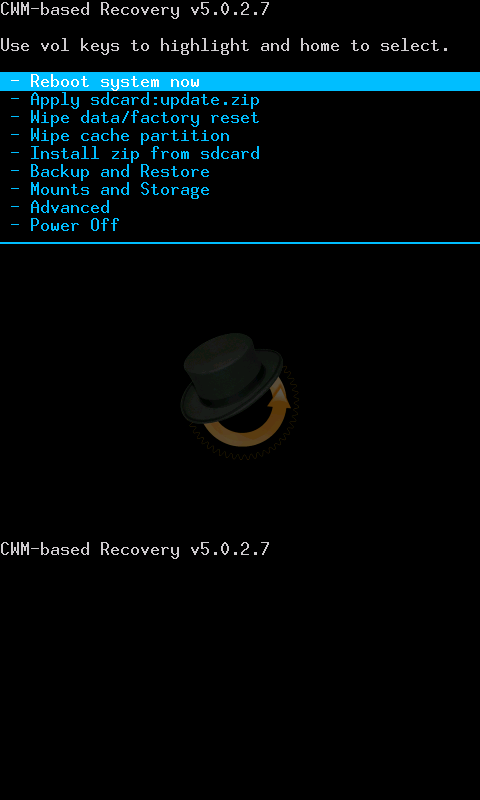
This is CWM or sometime people said Reboot Recovery
3. Advance>Reboot Recovery. Then install ZIP files below
4. ICS Stunner - CWM Recovery
5. LP5 modem - CWM Recovery
6. Done
Note:
-Do not use LP5 repack
-LP6 modem avail on LP5 modem link
-Copy all the download files into your internal SD card
-No s-pen usage like stock

How to make screen shot on stunner?
Settings >Euphoria Control>Power Menu Options>Check Show screenshot
Hold Power Button and you will see ScreenShot option


ICS Stunner 1.4.19 Screens. Apps


Widgets


Friday, April 20, 2012
TheMIDTeam the best ICS Team for Galaxy Note
If you are looking for ICS with good support you should look for TheMIDTeam. A bunch of expert developers join develop the ICS for Galaxy Note.
Continue reading here
Continue reading here
Monday, April 16, 2012
Easy to install and stable ICS for Galaxy Note
Are you eagerly to try ICS on your Galaxy Note. You can't wait any longer? I suggest you to install ICS Stunner. Easy to install and stable ICS.


Continue reading here


Continue reading here
Tuesday, April 03, 2012
Download and Install MidNote 3.0 (ICS LP5)
MidNote 3.0 STEPS with Links (Galaxy Note N7000). LP5 ICS FULL Working
1. STARTING BASE MUST BE GINGERBREAD WITH FULL ROOT
2. Mobile Odin
Open file...= MIDNOTE2.1_BASE.tar. http://69.46.67.99/mexicet/MIDNOTE2.1_BASE.tar
Kernel= zimage. Extract "midone3-kernel.tar" to get the zimage file. http://69.46.67.99/mexicet/midone3-kernel.tar
Enable everoot, inject superuser, inject mobile Odin, wipe data and cache are CHECKED
Press Flash Firmware
Answer "yes" on md5 verify
3. After the flash, you will be in CWM recovery. Select reboot
4. ONLY FIRST TIME you will see statusbar only
5. Long press power button, then select "reboot". You will have FRESH MidNote2.1.
6. Run Mobile Odin and make sure it has root permission
7. Reboot into CWM Recovery
8. Flash "MIDNOTE3.0.zip". http://69.46.67.99/mexicet/MIDNOTE3.0.zip . DON'T DO ANY WIPE IN THIS STEP, SIMPLY REBOOT
9. Now you are in MIDNOTE3.0 WITH FULL GAPPS INCLUDED
10. Reboot recovery using CWM manager (not 3 combo button)
11. Do a FULL WIPE DATA / FACTORY RESET, then wipe cache (NO Dalvik), then reboot
12. Check time option to "auto", then CHECK BOTH GOOGLE LOCATIONS option to "ON"
13. DO NOT ENTER YOUR GOOGLE ACCOUNT name and password in this step, finish your setup
14. Now select "APEX LAUNCHER"
15. Open Market and install "Maps", set GPS "off"
16. Open Maps, answer "ignore" if wants to check positions settings
17. LOCATE YOUR POSITION (wifi or 3G data must be ON)
Continue reading here
1. STARTING BASE MUST BE GINGERBREAD WITH FULL ROOT
2. Mobile Odin
Open file...= MIDNOTE2.1_BASE.tar. http://69.46.67.99/mexicet/MIDNOTE2.1_BASE.tar
Kernel= zimage. Extract "midone3-kernel.tar" to get the zimage file. http://69.46.67.99/mexicet/midone3-kernel.tar
Enable everoot, inject superuser, inject mobile Odin, wipe data and cache are CHECKED
Press Flash Firmware
Answer "yes" on md5 verify
3. After the flash, you will be in CWM recovery. Select reboot
4. ONLY FIRST TIME you will see statusbar only
5. Long press power button, then select "reboot". You will have FRESH MidNote2.1.
6. Run Mobile Odin and make sure it has root permission
7. Reboot into CWM Recovery
8. Flash "MIDNOTE3.0.zip". http://69.46.67.99/mexicet/MIDNOTE3.0.zip . DON'T DO ANY WIPE IN THIS STEP, SIMPLY REBOOT
9. Now you are in MIDNOTE3.0 WITH FULL GAPPS INCLUDED
10. Reboot recovery using CWM manager (not 3 combo button)
11. Do a FULL WIPE DATA / FACTORY RESET, then wipe cache (NO Dalvik), then reboot
12. Check time option to "auto", then CHECK BOTH GOOGLE LOCATIONS option to "ON"
13. DO NOT ENTER YOUR GOOGLE ACCOUNT name and password in this step, finish your setup
14. Now select "APEX LAUNCHER"
15. Open Market and install "Maps", set GPS "off"
16. Open Maps, answer "ignore" if wants to check positions settings
17. LOCATE YOUR POSITION (wifi or 3G data must be ON)
Continue reading here
Monday, April 02, 2012
AOSP ICS ready for daily use (Galaxy Note)
Galaxy Note N7000 AOSP ICS Android 4.0.4. Major problem of Video Recoding have been fixed on AOSP since developers get their hands on Android 4.0.4 source code. Even the 2 minor problems have work around for it.
There are solutions for bugs below. Look at 1st page here:
1. First SMS Message
2. Stock USB Mass Storage mounts internal SD only
3. Calendar sync fix
4. Keyboard dictionary fix
If you would like to have plain ICS on your galaxy note (No TouchWiz and Samsung apps). Have a try. The steps stated on OP. Very easy to follow.
Thank you IMILKA from XDA
TODO
1.
a) If you're on any other build: flash Chainfire ICS repack using mobile odin
b) If you're on previous imilka AOSP: do nothing
2. Upload aospgnXX.zip into your sdcard. Currently V07
3. Reboot into recovery
4. Flash aospgnXX.zip
5.
a) If you was on AOSP ICS previous versions and want to keep your data: do nothing
b) If you was on any other build: wipe data using CWM recovery
6. Reboot. Sit back and RELAX
This is what I have on my Galaxy Note. Sorry for the orientation :)
Take a break..watch the video I made :)
More screenshots below...


 Can you see mouse pointer on the screen. You will see that when you put your S-Pen near the screen.
You might hate this. Unable to make screen capture via S-Pen. Have to make screen shots via screenshots software. You will not have S-Memo and others Samsung Apps spesific build for Galaxy Note and S-Pen, but you could always looks for the APK :)


 Arabic pre-loaded
 Minimum running apps at the background

Photo Album Gallery. I don't have to worry about my photo. Auto sync to Google+, WIFI and while charging only!
 Stock Browser
 Car Home


My problems for now:
1. To read external SD Card. There are a few solutions for it. Looking for the best and permanent effect.
Continue reading here
There are solutions for bugs below. Look at 1st page here:
1. First SMS Message
2. Stock USB Mass Storage mounts internal SD only
3. Calendar sync fix
4. Keyboard dictionary fix
If you would like to have plain ICS on your galaxy note (No TouchWiz and Samsung apps). Have a try. The steps stated on OP. Very easy to follow.
Thank you IMILKA from XDA
TODO
1.
a) If you're on any other build: flash Chainfire ICS repack using mobile odin
b) If you're on previous imilka AOSP: do nothing
2. Upload aospgnXX.zip into your sdcard. Currently V07
3. Reboot into recovery
4. Flash aospgnXX.zip
5.
a) If you was on AOSP ICS previous versions and want to keep your data: do nothing
b) If you was on any other build: wipe data using CWM recovery
6. Reboot. Sit back and RELAX
This is what I have on my Galaxy Note. Sorry for the orientation :)
Take a break..watch the video I made :)
More screenshots below...


Applications


You might hate this. Unable to make screen capture via S-Pen. Have to make screen shots via screenshots software. You will not have S-Memo and others Samsung Apps spesific build for Galaxy Note and S-Pen, but you could always looks for the APK :)


Photo Album Gallery. I don't have to worry about my photo. Auto sync to Google+, WIFI and while charging only!


My problems for now:
1. To read external SD Card. There are a few solutions for it. Looking for the best and permanent effect.
Continue reading here
Subscribe to:
Posts (Atom)