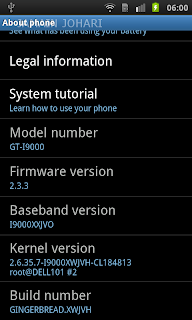
Are you eager to upgrade to latest I9000XWJVH.
I'm using Maxis SGS. I have no problem flashing to latest firmware.
-It fast
-Snappier
-Smooth scrolling in email apps
-Fast and Smooth browser
-Better battery life
-Better sound quality
What you should have:
1. ODIN
. Download ODIN + PIT (512)
. Download PIT(512)2. I9000XWJVH_XEEJV3|2.3.3|2011 May|Download
Link1 or
Link21.Double click to extract I9000XWJVH
You should have these
a. CSC_XEE_JV3.tar.md5
b. PDA_XWJVH_Sbl.tar.md5
c. PHONE_XXJVO.tar.md5
2.Open ODIN. (TODO: Task manager. Kill any KIES related files)
a. Odin3 v1.3.exe
3.Select the PIT, PDA , MODEM, CSC file in Odin.
PIT file: s1_odin_20100512.pit
4.Turn the phone into the download mode by pressing and holding VolumeDown+Home+Power.
5.Connect your phone with your computer and wait until the drivers are installed.
6.When the drivers are installed, click Start.
7.The phone will be flashed and once it’s finished, it will boot up. (Do NOT disconnect and interrupt this process!)
8.You have successfully flashed your phone.
PDA: XWJVH
MODEM: XXJVO
CSC: XEEJV3
Build Date: Wed May 4 18:03:59 KST 2011
Note:
1. Don't forget to setup you APN. See my next post
2. This update 2.3.3 is not for
Galaxy SL I9003 or even to another similar looking phones, if you proceed and update with the same then we are not responsible for the outcome of the update on your phone, it can even brick your phone.
Others:
Lagfix + EXT4


