Showing posts with label SGS. Show all posts

Saturday, January 28, 2012

Try ICS Emulator

Would like to give ICS a try? Do steps below:
  
1. Download the SDK
2. Extract the Zip to a folder on your desktop
3. Click SDK Manager.exe
4. Put a check in the box for Android 4.0, click Install Packages on bottom right
5. Go back into the Android folder on your desktop, open AVD Manager.exe

6. Click New

7. Give it a name, change the target to Android 4.0

8. Click Create AVD
9. Hit Start, wait five minutes or more.....be really patience...


Start playing ICS on my PC.... :)


Saturday, December 24, 2011

How to install and Root I9000XWJW1


This firmware is for Samsung Galaxy S I9000 only (International version)!
Details of the XWJW1 ROM

    Build: Android 2.3.6 Gingerbread
    Build Date: Tue Dec 13 13:03:26 KST 2011
    Product Model: GT-I9000
    Build PDA: I9000XWJW1

Interested to upgrade again? It's really fast.

TODO
1. Download Android 2.3.6 XWJW1 (Password: samfirmware.com)

You should have these:
  • APBOOT_I9000XWJW1_CL788890_REV03_user_low_ship.tar.md5
  • CODE_I9000XWJW1_CL788890_REV03_user_low_ship.tar.md5
  • KERNEL_I9000XWJW1_CL788890_REV03_user_low_ship.tar.md5

2. Download ODIN flashing tool
3. Set phone to Download mode... (you should be expert by now :)
Volume Down, Home, and Power button simultaneously. 
4. Just flash it like before...
Note:
Phone and CSC is not required.
Kill KIES

5. Click [Start]. Sit back and relax :)

Keep updating...........

To ROOT
1. Download this ROOTED_GTI9000_I9000XWJW1_stock+.zip

You should have these files.

2. Flash via ODIN the "zImage.tar" file
You should super expert by now...how to flash tar file via ODIN :)

3. zImage file installed and auto reboot your phone.
4. Phone Settings > Applications > Development > USB Debugging checked
5. Connect the phone to computer via USB cable again.
6. Launch RUNME.BAT
7. DONE. You are rooted.

Note:
Download Superuser from market.


Continue reading here

Thursday, December 01, 2011

ICS for I9000

Thinking of flashing my SGS to ICS but base on the user comments seems like ICS for I9000 still not for daily usage.

Continue reading here... XDA


Friday, November 18, 2011

I9000 running ICS

Going to try this... I will update my SGS to this ROM once the battery test done :)

I9000 running ICS? Anyone?


JVU battery test almost done and believe it or not, it's been more than 7 days. SGS rock!

Wednesday, November 09, 2011

How to root I9000XWJVU

Found simple way to root JVU and keep it near to stock.

 Download Easy Rooting Toolkit

Follow the instruction on the command prompt or screen above.

TODO

1. Enable "USB DEBUGGING". Menu>Settings>Applications>Development
Note: Make sure you have installed ADB drivers for your device (it inside Andorid SDK or KIES)
2. After enabling "USB DEBUGGING" connect phone to pc and let it download and install all the drivers
3. Enable "UNKNOWN SOURCES". Menu>Settings>Applications
Note: [OPTIONAL] increase screen timeout to 10 minutes

4. Connect USB cable to PHONE and PC
5. Run "runme.bat". DONE

Your phone will be rooted and superuser installed :)

Thank to $omator. Continue reading here


How to install I9000XWJVU

Would like to install XWJVU stock firmware from Samsung?

Latest firmware: I9000XWJVU/I9000TMNJV4/I9000XXJVT/I9000XWJVU
Modified: 21.10.2011 15:16:16

How to install JVU

1. Download I9000XWJVU
2. Install using ODIN.

Note: 
-Make sure your phone in the download mode (Volume Down+Home+Power button)

-Do not re-partition since you are on gingerbread
-You files, data and downloaded application will not be deleted.

Done!
At the end of the process you will get the above About Screen.....


Your screen icons will be back to stock. Need to re-arrange back to home screen

Note: 
  • No change log of this at the moment
  • Done Factory Reset just to make sure I have clean stock again to test. Data and apps will be deleted.

How to ROOT JVU click here

Continue reading here (you have to login)

Tuesday, October 25, 2011

I9000XXJVT+Semaphore+Battery %

I would like to show you the best performance and most stable ever been on Android Galaxy S.

What should I do?

1. What you need to do is flash your Galaxy S with stock I9000XXJVT
2. Flash latest semaphore . At the end of this process you will have ROOTED ROM, Recovery Mode and performance enhancement.

Optional
3. Install ODEX theme for your rooted I9000XXJVT via Recovery (Volume UP+Home+Power).

Downloads ODEX:
- Klick: JVT-ODEX-BatMod-ExtPowMen.zip | with original Glass Lock from Samsung
- Klick: JVT-ODEX-BatMod-ExtPowMen-AOSPLock.zip | with AOSP Lockscreen
- Klick: JVT-ODEX-BatMod-ExtPowMen-ClearGlassLock.zip | With Clear Glass Lock

Download ZIP file above and copy to your SD Card and install via recovery mode.
Note: CWM Manager available inside semaphore.

4. DONE.

This is what you will get.
AOSP lock screen
Extended Power Menu
Battery % on the status bar


Note: This is the longest time I used the phone without flashing....waiting for stable DarkyROM RE.

Sunday, October 23, 2011

SGS soft brick? How to unbrick...

Have you seen this on your phone? What you should do.
  1. Relax. Don't panic. Calm down :)
  2. Remove you phone battery
  3. Wait for 10 minutes
  4. Put battery in
  5. Combo button. Volume-down+home+power (hold it longer)
The rest, continue with ODIN and flash your stock ROM.

Other tips below.

Software Features:
  •     Will work on all Samsung devices which use Odin
  •     Is a single, portable executable
  •     Is the first one-click anything for our devices on Linux
  •     Works on Mac
  •     Works on Windows
  •     Is open source
  •     Is programmed in Java
  •     Deploys and installs Heimdall for your OS
  •     Is super easy to use…. Only one button!
Download one-click-unbrick here

Continue reading here

Friday, October 21, 2011

My Phone SGS I9000

My Phone SGS I9000.1 year old.
With new RED cover.... :)
2nd try..

Update to nightly version...after a day of using stable version... CM7.1 fast and stable...but the battery life seems like shorter than stock+semaphore

 Portrait home screen
 Landscape clock
Landscape HOME  :)

Semaphore JVT and DarkyROM JVT Base RE

After a few weeks, there are still no changes or update on the Semaphore and DarkyROM related to I9000XXJVT. Seems like it stable enough if install it properly and fresh.

Waiting for more leak from Samsung or are we waiting for Ice Cream Sandwich?


How to install CyanogenMod 7.1

How to install CyanogenMod 7.1 stable version? CM7.1 is base on Android 2.3.7

I assume that you are from stock kernel and not rooted.

TODO:
1. Download CM7.1 stable version
2. Backup you current application to APK file format and copy to your PC. You need it after CM7 installation completed. How to backup file to APK? Click here


How to install CM7.1?
1. Root your device and install ClockworkMod Recovery.

If you do not know how to root your current ROM. Try steps inside two links below. It will ROOT and install ClockworkMod Recovery by default.
Note: If you had rooted your current rom and have Recovery Mode, continue with next steps

2. Copy "update-cm-7.1.0-GalaxyS-signed.zip" into you phone SD Card. Rename it to "update.zip"

3. Reboot into Recovery using 3-button-combo (Volume Up+Home+Power button)
4. Do a backup! Best practise
5. WIPE (wipe data/factory reset + wipe cache partition + Dalvik)
6. Install "update.zip" from internal sdcard using Recovery Mode
7. DONE. Sit back and relax
This is what you will get.

Note: 
  • You will have clean CyanogenMod 7.1. Very FAST!
  • No Google or Samsung apps. Need to download and install separately
  • Do not use new market. Download Old Market and copy into you phone SD Card.
  • Remove "marketupdater.apk" and "vending.apk" using DarkyROM tool. Install this first.
 Copy Old Market "market.2.3.4.apk" into "Darky/uninstalled/sys" folder

 Uninstall "marketupdater.apk" and "vending.apk"
Install "market.2.3.4.apk".  DONE. You will have Old Market and continue your download business. :)

You can't download google apps from old market? You did not see most of the google apps? I will show you how to download it after the break... coming soon


Thursday, October 20, 2011

CyanogenMod 7.1 video

NEW. How to install CyanogenMod 7.1 for SGS

After looking at this video, I really need to try and feel it myself. Do you like it?


This CyanogenMod 7.1 stable version and it's mine :) First time recording my work...


lol...wrongly holding the camera (phone camera)..coming soooon...

Favorite features of CM7.1

  •     Android 2.3.7
  •     Bluetooth Mouse support
  •     Swipe-to-clear notifications (one at a time, ala webOS)
  •     Revoke app permissions
  •     Latest SuperUser app
  •     Control brightness by sliding on the status bar. Perhaps taken from the Galaxy S2
  •     Launch apps via Gestures in the background
  •     Touch to Focus in the Camera
  •     Native Screenshot, finally!
  •     Bluetooth Tethering

  •     Improve ADWLauncher scrolling/zoom performance
  •     Option to disable vibration while in-call
  •     Improve notification swipe-to-clear
  •     Wake on volume key option
  •     Support for revoking application permissions
  •     Control brightness by sliding on statusbar
  •     Option to hide hold button during call
  •     Support for launching apps via gestures in the background
  •     Screenshot feature via power menu
  •     Mute camera shutter option

Sunday, October 16, 2011

Video Converter. Android. SGS

I had found very nice video converter and would like to share with you. It's FREE and able to convert to full video length.

Download FREE STUDIO


You could see on the photo above what you can convert.
Can you see Android there?? YESSSSS

Can you see Samsung Galaxy S there?? YESSSSSS...iLike


Finally I had found complete package of video converter.

Thursday, October 06, 2011

New Firmware coming I9000XXJVT

New firmware coming to SGS user. I9000XXJVT Android 2.3.5 Build Date Sep 29 ready for download.
Note: Wow! Samsung-updates site had exceed limit. Lucky me...I'm done. :). 
  • I'm uploading it to dropbox in case you need it.
  • I'm using Dropbox to share file. FREE 2GB space. 

What's new (for the moment):
  • blue over-glow effect
  • endless scrolling app menu
  • endless scrolling home screen menu
  • App are installing faster.Something is different with this firmware it's definitely faster.Apps are loading faster.
  • Start market couple of times and it will update itself to the latest version.
  • One thing to add is that JVT has the best modem ever, phone signal has been full
  • No WiFi bugs
  • RAM= 336 mo

Bad news
  • APN Setting GONE
  • Someone report there is phone Force Close (FC)


Flash using 3 files (ODIN): 
PIT=s1_odin_20100512.pit
PDA=CODE_I9000XXJVT_CL617736_REV03_user_low_ship.tar.md5
PHONE=MODEM_I9000XXJVT_REV_00_CL1064602.tar.md5
CSC=GT-I9000-CSC-MULTI-OXAJVT.tar.md5

How to flash it? After the break......

Note: While downloading get your phone battery 100% charge and all your data backup to your PC or cloud...
Continue reading here....

Thursday, September 15, 2011

What's new in Android 2.3.3, 2.3.4, 2.3.5, 2.3.6

2.3.3

  • Android 2.3.3 is a small feature release that adds several improvements and APIs to the Android 2.3 platform.

2.3.4

  • Added support for voice or video chat using Google Talk.


2.3.5

25 Jul 2011
  • Brought improved network performance for the Nexus S 4G, among other fixes and improvements.
  • Fixed bluetooth bug on Samsung Galaxy S
  • Improved Gmail application
What's New in GMail?
  1. Save bandwidth and battery by only syncing priority mail
  2. Use label notifications to mash up filters, labels, and ringtones
  3. Remember ‘Show Pictures’ for senders
  4. Turn off sticky message actions in landscape or all orientations
  5. Better TalkBack support for accessibility
  6. Performance improvements
2.3.6

  • Voice search bug fixed.

Note: For sure, each release will include bug fixes as well....let's hope we could get Ice Cream Sandwich on our SGS :)

Saturday, May 07, 2011

Maxis APN for SGS I9000


Useful after flashing to new firmware. If you did not setup this, you will not be able to browse internet via 3G services.

Maxis APN. 3G WAP & MMS CONFIGURATION

1. Press Menu > Settings > Wireless Controls > Mobile networks (Android Phone)

2. Select Access Points Names

3. Press Menu button > Select New APN

4. Enter the following details for WAP settings:

.Name : Maxis

.APN : (NOTE: unet for 3G or net for GPRS)

.Proxy : 202.75.133.49

.Port : 80

.Username: maxis

.Password : wap

.Authentication Protocol:

5. Scroll further down.

6. Enter the following details for MMS settings :

.Server : Maxis MMS

.MMSC : http: //172. 16.74.100:10021/mmsc

.MMS proxy : 202.75.133.49

.MMS port : 80

.MCC : 502

.MNC : 12

.Autehntication Type: Not set

.APN Type : Internet+MMS

Menu>SAVE

To test it out. Disable wireless and try to browse internet via browser

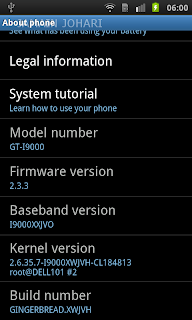
SGS I9000 Upgrade to I9000XWJVH


Are you eager to upgrade to latest I9000XWJVH.

I'm using Maxis SGS. I have no problem flashing to latest firmware.
-It fast
-Snappier
-Smooth scrolling in email apps
-Fast and Smooth browser
-Better battery life
-Better sound quality

What you should have:
1. ODIN . Download ODIN + PIT (512) . Download PIT(512)

2. I9000XWJVH_XEEJV3|2.3.3|2011 May|Download Link1 or Link2

1.Double click to extract I9000XWJVH
You should have these
a. CSC_XEE_JV3.tar.md5
b. PDA_XWJVH_Sbl.tar.md5
c. PHONE_XXJVO.tar.md5

2.Open ODIN. (TODO: Task manager. Kill any KIES related files)
a. Odin3 v1.3.exe

3.Select the PIT, PDA , MODEM, CSC file in Odin.
PIT file: s1_odin_20100512.pit

4.Turn the phone into the download mode by pressing and holding VolumeDown+Home+Power.
5.Connect your phone with your computer and wait until the drivers are installed.
6.When the drivers are installed, click Start.
7.The phone will be flashed and once it’s finished, it will boot up. (Do NOT disconnect and interrupt this process!)
8.You have successfully flashed your phone.


PDA: XWJVH
MODEM: XXJVO
CSC: XEEJV3

Build Date: Wed May 4 18:03:59 KST 2011

Note:
1. Don't forget to setup you APN. See my next post
2. This update 2.3.3 is not for Galaxy SL I9003 or even to another similar looking phones, if you proceed and update with the same then we are not responsible for the outcome of the update on your phone, it can even brick your phone.

Others:
Lagfix + EXT4