Hi
Having problem where your Google Play Store not loading images in you android phone?
Try this method. It's working for me on my Galaxy Note phone.
1. Turn on your WiFi.
2. Let it connect to your SSID or WiFi network. Long press over it.
3. You can find it in the WiFi settings.
4. Go to: modify network config.
5. Click on: show advanced options.
Scroll down n change IP settings field from DHCP to STATIC.
Scroll down n go to DNS 1 n DNS 2 fields only.
Change it.
DNS1: 8.8.8.8
DNS2: 4.4.4.4
6. Save
7. DONE!
Note: Do not change any other fields.
I hope it will fix your problem.

Showing posts with label google. Show all posts
Showing posts with label google. Show all posts
Sunday, February 15, 2015


Friday, November 01, 2013
Google Nexus 5 Officially Launch
Google Nexus 5 Officially Launch

 Nice on screen


 Nice on hand. Image from TheVerge
Let's see what we will get with this new phone and KITKAT Android 4.4

What I like most is Translucent Bar. Most requested features in custom ROM. Xposed Framework have this as well.

Better Google Now. Just talk. Don't have to press any button. Active Google Now.
 HDR+ camera. Fast and better lighting
 Wireless printing. Since more printer go wireless, this is good.
 Cloud and Location based services. Seems like Google going to build in all famous apps features such as FourSquare into theirs and deep build-in inside.
Enjoy the Video
For DEVELOPER and Technical Guy.....for some users this is your sleeping pills.. :)


Let's see what we will get with this new phone and KITKAT Android 4.4

What I like most is Translucent Bar. Most requested features in custom ROM. Xposed Framework have this as well.

Better Google Now. Just talk. Don't have to press any button. Active Google Now.


Enjoy the Video
For DEVELOPER and Technical Guy.....for some users this is your sleeping pills.. :)
Thursday, May 24, 2012
Google WINS, Android doesn't infringe Oracle's patents
Google released a statement stating "Today's
jury verdict that Android does not infringe Oracle's patents was a
victory not just for Google but the entire Android ecosystem."

Android will Now enjoy an enhanced presumption of stability and legal independence. It will also give Google the upper hand in any further attempts to reach a settlement between them and Oracle.
What a relief........

Android will Now enjoy an enhanced presumption of stability and legal independence. It will also give Google the upper hand in any further attempts to reach a settlement between them and Oracle.
What a relief........
Thursday, March 15, 2012
How to install N7000XXLC1
How to install N7000XXLC1?
1.
Download N7000XXLC1
2.
You need to have ODIN for Desktop v1.87 + Galaxy Note 16GB PIT file
3.
Run ODIN and put in file as image below. Click [Start].
 ODIN Start....Sit back and relax
 ODIN End
Warning:
-It's FULL WIPE. All Apps and Data will be deleted
-ROOT will be removed
Note:
-For me I do not need root or custom ROM anymore. Firmware LA6 and above stable, fast and good battery usage on my Galaxy Note. These are 3 main criterias of my firmware selections.


 Auto install after login via Google Restore...no worry, but if you have too many external installation it might be tedious process for you. Need to click and install one-by-one.
But still I have to configure back all the apps.
EDIT:
Some GNote user update that without PIT and Re-Partition, it will NOT WIPE your phone. You will be upgrade successfully.
1.
Download N7000XXLC1
2.
You need to have ODIN for Desktop v1.87 + Galaxy Note 16GB PIT file
3.
Run ODIN and put in file as image below. Click [Start].


Warning:
-It's FULL WIPE. All Apps and Data will be deleted
-ROOT will be removed
Note:
-For me I do not need root or custom ROM anymore. Firmware LA6 and above stable, fast and good battery usage on my Galaxy Note. These are 3 main criterias of my firmware selections.


But still I have to configure back all the apps.
EDIT:
Some GNote user update that without PIT and Re-Partition, it will NOT WIPE your phone. You will be upgrade successfully.
Tuesday, March 13, 2012
Samsung TouchWiz Change Folder Name
Have you tried to change folder name in TouchWiz or TwLauncher? This is how to do it.
 After you have done the application grouping in a folder, by default TwLauncher will give you default name as Folder1, Folder2, etc...
How to rename it?
Click on the folder in Home Screen. It will pop-up as below.
 Click or press and hold on the top area of the dialog box. You will be able to rename it as below.
 Change the folder name as you like.
 This is what you will get. More clean screen with apps in the folder.
Note:

You can do it in the Application Mode as well to permanently rename the folder with the same technique.
1. Open the folder
2. Press+hold on top of the folder
3. Rename it

How to rename it?
Click on the folder in Home Screen. It will pop-up as below.


Note:

1. Open the folder
2. Press+hold on top of the folder
3. Rename it
Sunday, March 04, 2012
Injecting Superuser and Busybox via ODIN
2. Run Desktop ODIN and select the kernel "speedmod-kernel-n7000-k1-5-Odin.tar" as image below

3. Click [Start].
4. Sit back and relax.
Note:
-DO NOT Re-partition. This process will replace your Galaxy Note kernel only.
-DO NOT Re-partition. This process will replace your Galaxy Note kernel only.
-This is for Android phone who are not yet ROOTED. For rooted user you may download this. SpeedMod K1-5 for CWM
What do you get after this process?
SpeedMod's core features are:
- Super stable: No undervolting, overclocking or potentially unstable modifications
- Fast and smooth: Compiler and code optimizations
- Excellent battery life: Remove unecessary logging and debugging
- Super stable: No undervolting, overclocking or potentially unstable modifications
- Fast and smooth: Compiler and code optimizations
- Excellent battery life: Remove unecessary logging and debugging
Root and CWM:
- Automatically installs root (su)
- CWM recovery
(This is what most of the people want. ROOT)
Screen and misc tweaks:
- MDNIE screen sharpness tuning (improves text readability)
- MDNIE color tuning (reduces over-saturation of color)
- init.d, TUN, CIFS, IPV6 Privacy support
Performance:
- CPU governor tweaks: increase responsiveness
- IO tweaks
- Read ahead tweaks
- Updated to jhash3
- Compiled with optimizations using Linaro GCC 4.5 toolchain
- Switched to SLAB instead of SLUB
- GPU base speed increased to 200MHz from 160MHz
- Optimized CPU hotplug
- SCHED_MC multi-core aware scheduler
Turned off unnecessary logging for better smoothness and efficiency:
- Disabled Android Debug Logger / logcat
- Disabled Samsung debug
- Disabled various kernel debugging, statistics and tracing options
- Automatically installs root (su)
- CWM recovery
(This is what most of the people want. ROOT)
Screen and misc tweaks:
- MDNIE screen sharpness tuning (improves text readability)
- MDNIE color tuning (reduces over-saturation of color)
- init.d, TUN, CIFS, IPV6 Privacy support
Performance:
- CPU governor tweaks: increase responsiveness
- IO tweaks
- Read ahead tweaks
- Updated to jhash3
- Compiled with optimizations using Linaro GCC 4.5 toolchain
- Switched to SLAB instead of SLUB
- GPU base speed increased to 200MHz from 160MHz
- Optimized CPU hotplug
- SCHED_MC multi-core aware scheduler
Turned off unnecessary logging for better smoothness and efficiency:
- Disabled Android Debug Logger / logcat
- Disabled Samsung debug
- Disabled various kernel debugging, statistics and tracing options


Warning! Counter and Triangle will be displayed after reboot. You might need this TraingleAway

You may try a few days with speedmod kernel and if you did not like it, just flash stock to remove triangle and counter on start-up. Click here
Continue reading here
Tuesday, February 21, 2012
How to install N7000XXLB1
How to install latest Galaxy Note Firmware 2.3.6 Open Germany February 2012
1. Download N7000XXLB1 here
2. Extract download file. No password required.
3. Set you phone in download mode.
- Shutdown your phone
- Press Home + Volume Down + Power Button
- Press Volume UP to confirm. You are in download mode and ready to flash
4. Connect your USB cable from Phone to PC
5. Wait for COM Port connected (Yellow in color)
 Note:
Note:
- Only PDA file.
- Do not check Re-Partition
6. Click [Start] button. Sit back and relax.
 After process complete.
 This is possible change log to this new firmware. Music Hub and Readers Hub get updated.
Why? How do I know it? These 2 icons have been moved. Seems like it have been deleted and newly install application icons located at the end.

New XXLB1..........It's NO WIPE. So no worry.
All your data and applications just like before you upgrade.
Note:
If you are root user. Your root will be gone. You have to wait for CF-Root kernel and flash via mobile odin as usual.
1. Download N7000XXLB1 here
2. Extract download file. No password required.
3. Set you phone in download mode.
- Shutdown your phone
- Press Home + Volume Down + Power Button
- Press Volume UP to confirm. You are in download mode and ready to flash
4. Connect your USB cable from Phone to PC
5. Wait for COM Port connected (Yellow in color)

- Only PDA file.
- Do not check Re-Partition
6. Click [Start] button. Sit back and relax.


Why? How do I know it? These 2 icons have been moved. Seems like it have been deleted and newly install application icons located at the end.

New XXLB1..........It's NO WIPE. So no worry.
All your data and applications just like before you upgrade.
Note:
If you are root user. Your root will be gone. You have to wait for CF-Root kernel and flash via mobile odin as usual.
Friday, February 17, 2012
Galaxy Note ICS N7000. N7000XXLP1
Galaxy Note ICS.. Really close..............Grrrrrrr...
 ICS for Galaxy Note N7000XXLP1 on the way......
Start charging my phone to 100% and backup whatever required......

Start charging my phone to 100% and backup whatever required......
Thursday, February 09, 2012
How to install ICS keyboard
Would like to experience ICS keyboard on your phone? It's simple and easy to use. With BIG button and spacing. It look better on Galaxy Note :)

Download ICS Keyboard APK here

Download ICS Keyboard APK here
Saturday, January 28, 2012
Try ICS Emulator
Would like to give ICS a try? Do steps below:
1. Download the SDK
2. Extract the Zip to a folder on your desktop
3. Click SDK Manager.exe
4. Put a check in the box for Android 4.0, click Install Packages on bottom right
5. Go back into the Android folder on your desktop, open AVD Manager.exe

6. Click New
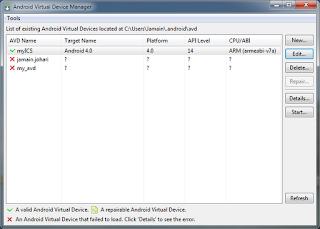
7. Give it a name, change the target to Android 4.0

8. Click Create AVD
9. Hit Start, wait five minutes or more.....be really patience...


 Start playing ICS on my PC.... :)
1. Download the SDK
2. Extract the Zip to a folder on your desktop
3. Click SDK Manager.exe
4. Put a check in the box for Android 4.0, click Install Packages on bottom right
5. Go back into the Android folder on your desktop, open AVD Manager.exe

6. Click New

7. Give it a name, change the target to Android 4.0

8. Click Create AVD
9. Hit Start, wait five minutes or more.....be really patience...


Friday, January 20, 2012
How to install N7000XXLA4
Would like to install latest ROM for Samsung Galaxy Note? N7000XXLA4 / XXLA4
Download N7000XXLA4 here
Once you download it, there are two files inside
1. N7000XXLA4_N7000OXALA4_N7000XXLA4_HOME.tar.md5
2. SS_DL.dll (Flash via ODIN Ignore this file)
Have CRC problem? This is what I did. Using IZArc I convert the "zip" file to "7z" file format.


Unzip "N7000XXLA4_N7000OXALA4_DBT.7z". You should be able to extract it :)
How to install it?
1. Run ODIN
2. Select TAR/MD5 file. See image below

3. Just fill in PDA. The rest leave it blank.... Connect your phone to PC and waits for COM Port connection.
4. Click [Start] button. Sit back and relax.
5. Once restart. Remove USB cable. DONE
Good News. It's a NO WIPE version. Your phone data and configuration just like before flashing it. No data or application restore required.
 Get UPDATED!...
If you already rooted and would like to upgrade to LA4. Download CF-Root-SGN_XX_OXA_LA4-v5.0-CWM5.zip here. You need to flash it via Mobile Odin.
Continue reading CF-ROOT for Galaxy Note here
Download N7000XXLA4 here
1. N7000XXLA4_N7000OXALA4_N7000XXLA4_HOME.tar.md5
2. SS_DL.dll (Flash via ODIN Ignore this file)
Have CRC problem? This is what I did. Using IZArc I convert the "zip" file to "7z" file format.


Unzip "N7000XXLA4_N7000OXALA4_DBT.7z". You should be able to extract it :)
How to install it?
1. Run ODIN
2. Select TAR/MD5 file. See image below

3. Just fill in PDA. The rest leave it blank.... Connect your phone to PC and waits for COM Port connection.
4. Click [Start] button. Sit back and relax.
5. Once restart. Remove USB cable. DONE
Good News. It's a NO WIPE version. Your phone data and configuration just like before flashing it. No data or application restore required.

If you already rooted and would like to upgrade to LA4. Download CF-Root-SGN_XX_OXA_LA4-v5.0-CWM5.zip here. You need to flash it via Mobile Odin.
Continue reading CF-ROOT for Galaxy Note here
Thursday, January 19, 2012
New firmware for GT-N7000. N7000XXLA4
Again. New firmware for GT-N7000. XXLA4 means and upgrade of XXLA3. For sure there are updates or bugs fixing in it.
Model: GT-N7000
Product Code: GT-N7000ZBADBT
Modified: 2012-01-13
HIDSWVER: N7000XXLA4 / N7000OXALA4 / N7000XXLA4 / N7000XXLA4
Filename: GT-N7000_DBT_1_20120113101724.zip.enc2
CRC: 4056522162
Strange thing is, it's Country/Carrier is Germany NOT Open Europe.
Download here
Password: samfirmware.com
I will blog how to install it later. Now downloading.
Reason to upgrade:
Very good review and improvement in this firmware.
Continue reading....
Model: GT-N7000
Product Code: GT-N7000ZBADBT
Modified: 2012-01-13
HIDSWVER: N7000XXLA4 / N7000OXALA4 / N7000XXLA4 / N7000XXLA4
Filename: GT-N7000_DBT_1_20120113101724.zip.enc2
CRC: 4056522162
Strange thing is, it's Country/Carrier is Germany NOT Open Europe.
Download here
Password: samfirmware.com
I will blog how to install it later. Now downloading.
Reason to upgrade:
Very good review and improvement in this firmware.
- The wifi connection is much more stable and connects faster to known hotspots.
- The signal strength has improved.
- The lag that was evident has been reduced substantially.
- The phone reboots much faster and unlocks faster.
- Apps like Whatsapp work much better than before without lag.
- Battery life has been about the same.
- The touch is now more responsive than before as well as scrolling vertically.
- The stock browser is a lot faster.
- Has not crashed since update (yet).
- Phone seems zippier generally in scrolling and some apps.
- Wallpaper issues i had with live wallpapers freezing and crashing and rebooting phone seem to have gone now.
- Stock file browser seems zippier too and gives me the 'processing' overlay for a lot less time or it almost instantly disappears (but still there).
- Stock video player which was unusable earlier is usable now and no longer freezing or forceclosing
- New phone icon on the bottom right. Who asked Samsung to change the old one?
- New lock screen animation. Who complained about the last one?
- New call icon at logs call
- Speed of the phone: This build is FAST. I haven't had one slow down yet! For example, in Whatsapp I've always had it load up and for every contact I have a picture. In my last build, I could see the list come up, but then every contact picture would load (and it took less than a second, but I could see the process go from no picture --> loading one by one, very quickly). Now they're all loaded instantly. No waiting. Applications start VERY fast, but I guess there is still some slowdown. Unlocking my phone is even faster than before. I believe the distance you have to drag (or maybe speed in which to move) has been reduced in turn reducing time to unlock.
- Touch screen sensitivity:I find the screen sensitivity just fine. Very sensitive to be honest.
Continue reading....
Sunday, January 15, 2012
How to install N7000XXLA3
You are tired of custom ROM problems? Install this LA3 the fastest, smooth and most important stable and no battery heat.
How to install N7000XXLA3 Android version 2.3.6 Open Europe version
Download N7000XXLA3_N7000OXALA3_OXA.rar here
Password: samfirmware.com
 Run ODIN and select file as in the image above. Re-Partition checked.
Your phone will be wiped. Need to re-install all the apps (Google restore). That why we need to save our info in the clouds such as Google contacts, calendar, evernote, colornote, etc...
 Updated!
Improvements in XXLA3 Firmware:
 Additional running services left overnight with 1-5% battery usage. Reasonable amount of battery usage with the running services.

Antutu score. Stock LA3
How to install N7000XXLA3 Android version 2.3.6 Open Europe version
Download N7000XXLA3_N7000OXALA3_OXA.rar here
Password: samfirmware.com

Your phone will be wiped. Need to re-install all the apps (Google restore). That why we need to save our info in the clouds such as Google contacts, calendar, evernote, colornote, etc...

Improvements in XXLA3 Firmware:
- Touch response has been improved,
- Overall user experience is much more fluid than before


Antutu score. Stock LA3
Subscribe to:
Posts (Atom)