There is simplest way of rooting your STOCK ICS. No worry about YELLOW Triangle or Binary counter.
You just need to go to this page and find your firmware version.
For example XXLRT look for LRT. Firmware DDLR9, look for LR9
It has two versions.
1. Stock Recovery mode (Volume UP + Home + Power button), download "ZIP" file
2. PC ODIN or Mobile ODIN mode, download ".tar.md5" file.
Note:
At the end of the process your GNote will be ROOTED + CWM installed.
Continue reading here

Showing posts with label Ice Cream Sandwich. Show all posts
Showing posts with label Ice Cream Sandwich. Show all posts
Sunday, October 07, 2012


Tuesday, May 08, 2012
Ice Cream Sandwich on the AT&T Samsung Galaxy Note
Galaxy Note ICS with full of TouchWiz
Do you like it? ICS with full of TouchWiz.
Continue reading here
Do you like it? ICS with full of TouchWiz.
Continue reading here
Tuesday, February 21, 2012
How to install N7000XXLP1
How to install N7000XXLP1. Ice Cream Sandwich Android 4.0.3
1. Download it here
Download N7000XXLP1
Download from Hotfile
Correct PIT file. By default they provide you 32GB PIT file. DO NOT use 32GB PIT file
Download Q1_20110914_16GB.pit
2. Extract downloaded file
3. Set you phone in download mode.
- Shutdown your phone
- Press Home + Volume Down + Power Button
- Press Volume UP to confirm. You are in download mode and ready to flash
4. Connect your USB cable from Phone to PC
5. Wait for COM Port connected (Yellow in color)
6. Click [Start] button. Sit back and relax.

You should have very basic BETA ICS on your phone. Good luck!

Continue reading here
1. Download it here
Download N7000XXLP1
Download from Hotfile
Correct PIT file. By default they provide you 32GB PIT file. DO NOT use 32GB PIT file
Download Q1_20110914_16GB.pit
2. Extract downloaded file
3. Set you phone in download mode.
- Shutdown your phone
- Press Home + Volume Down + Power Button
- Press Volume UP to confirm. You are in download mode and ready to flash
4. Connect your USB cable from Phone to PC
5. Wait for COM Port connected (Yellow in color)
6. Click [Start] button. Sit back and relax.

You should have very basic BETA ICS on your phone. Good luck!

Continue reading here
Thursday, February 09, 2012
How to install ICS keyboard
Would like to experience ICS keyboard on your phone? It's simple and easy to use. With BIG button and spacing. It look better on Galaxy Note :)

Download ICS Keyboard APK here

Download ICS Keyboard APK here
Saturday, January 28, 2012
Try ICS Emulator
Would like to give ICS a try? Do steps below:
1. Download the SDK
2. Extract the Zip to a folder on your desktop
3. Click SDK Manager.exe
4. Put a check in the box for Android 4.0, click Install Packages on bottom right
5. Go back into the Android folder on your desktop, open AVD Manager.exe

6. Click New
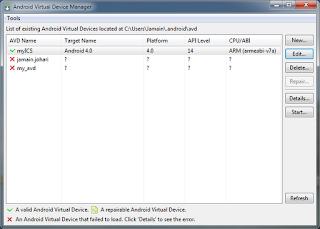
7. Give it a name, change the target to Android 4.0

8. Click Create AVD
9. Hit Start, wait five minutes or more.....be really patience...


 Start playing ICS on my PC.... :)
1. Download the SDK
2. Extract the Zip to a folder on your desktop
3. Click SDK Manager.exe
4. Put a check in the box for Android 4.0, click Install Packages on bottom right
5. Go back into the Android folder on your desktop, open AVD Manager.exe

6. Click New

7. Give it a name, change the target to Android 4.0

8. Click Create AVD
9. Hit Start, wait five minutes or more.....be really patience...


Tuesday, December 13, 2011
ICS Lock Screen


That is easy:
1. Download GO Launcher Ex
2. Download GO Locker ICS Theme


Select Ice Cream as your locker. DONE
You will have ICS locker screen. You have the selection of UNLOCK the phone or open CAMERA.
Note:
This will solve accidentally opening my galaxy note since original lock is a glass unlock. ICS lock, you have to specifically press on the Lock key and drag to the Un-lock key area.
Friday, November 18, 2011
I9000 running ICS
Going to try this... I will update my SGS to this ROM once the battery test done :)
I9000 running ICS? Anyone?

JVU battery test almost done and believe it or not, it's been more than 7 days. SGS rock!
I9000 running ICS? Anyone?

JVU battery test almost done and believe it or not, it's been more than 7 days. SGS rock!
Wednesday, October 26, 2011
ICS Launcher

What is ICS Launcher?
Ice Cream Sandwich launcher is a home replacement that will give any Android device the look and feel of the newly released android update, 4.0 ice cream sandwich. This launcher do its best to clone the UI and features of the official update.
What are the main features of Ice Cream Sandwich Launcher?
- Clones Ice Cream Sandwich 4.0
- Extremely Fast and Smooth Scrolling (When properly set up)
- ICS Wallpaper Chooser with 9 wallpapers
- Hide Notification Bar (Gesture/Swipe up)
- ICS Settings
- ICS Styled Google Search Bar
- Icy Blue ICS Analog clock
- Hide Labels (Under Launcher Settings in ICS Settings)
- Tutorials and Help
- Supports all sources of wallpapers (e.g. Cyanogenmod, gallery, 3rd party choosers)
- Supports Live Wallpapers (All sources)
- Scrollable Widgets (e.g. HTC, Colorize Widgets, Fancy Widgets)
- Re-Sizable Widgets (Any resizable widget)
Download from market


Click six dots will show all the apps..


Click on ICS middle button

Friday, October 21, 2011
Semaphore JVT and DarkyROM JVT Base RE
After a few weeks, there are still no changes or update on the Semaphore and DarkyROM related to I9000XXJVT. Seems like it stable enough if install it properly and fresh.
Waiting for more leak from Samsung or are we waiting for Ice Cream Sandwich?
Waiting for more leak from Samsung or are we waiting for Ice Cream Sandwich?
Subscribe to:
Posts (Atom)