Showing posts with label Install. Show all posts

Thursday, May 22, 2014

How to Install AryaMod v7 ROM?

How to Install AryaMod ROM:
  1. Verify MD5 checksum of the rom zip, if you don't know how to calculate it see here
  2. Download and flash safe kernel, I prefer latest PhilZ N7000 TW kernel
  3. Reboot to recovery again
  4. Go to "Backup and Restore>Misc Nandroid Settings>Preload Partition" and set it to Include
  5. Backup your current Rom
  6. Go to "Wipe Data>Factory and Reset> hit Wipe Data-Cache-System-Preload"
  7. Choose - Yes, I will install a new ROM!
  8. Return to main page> Advance option and wipe davlik
  9. Return to main page> Mount and storage, format system, format data, format preload 
  10. Flash ROM zip
  11. Reboot and enjoy.
  12. After boot up go to Developer options and change animation window, transition and animator duration scales to 0.5x
Note:
  1. If you have slow network connection, backup all your APK before flashing
  2. DO NOT Wipe AFTER Flash ROM!
  3. DO NOT Flash UNKNOWN or UNAPPROVED MOD
  4. Let's your installed ROM cool down after flash. It's need to sync to Google services such as contacts, calendar and many others at the background
  5. You might need to restart after a few hours or you did not see any account sync happening at the background
  6. You may use Google auto restore services to ease your reinstall process
  7. DO NOT use Titanium to restore if you did not know what are you doing
  8. Backup your stuff into the CLOUD using tools such as Google contacts, calendar, Evernote, DropBox, Google Drive, SMS Backup+, etc...
  9. Usually I will skip Google Account login. This to allow ROM to clear it's own installation process. Once clear, click on Google Play. Google will ask you to login and let's it restore all your previous installed apps (make sure you have a clean installed apps list). This is how I reduce my installation process.
  10. Use Nova Launcher to restore back your home screen! (Remember to backup your Nova home screens)
This is how I do it and it's works for me. Fast and Stable. You might have better way or suitable process for you. It'a all depend on what type of applications you are using.

 Make sure you have a clean Apps List

 New GUI :)

 Pre-Installed AdAway. This is to block advertisement

 Updated Xposed Installer

 DO NOT Sync Picasa Web Albums. If you have problem with slow Gallery loading.

 Install Photo Editor to enable photo edit via Gallery. Get the APK. You don't have to login to Samsung Acct.

Clear Gallery data for faster loading if you have sync Picasaweb previously.

Continue reading here...

Aryamod V7 download page here. Thanks @kmokhtar for his hardwork.


Friday, September 13, 2013

Installing GT N7000XXLTA

Testing latest Samsung Firmware N7000XXLTA

If you would like to install it.
1. Download PC ODIN 1.85 here and download the N7000XXLTA firmware here

2. Run PC Odin on your desktop and add the "N7000XXLTA_N7000BOLT1_N7000DTMLT5_HOME.tar.md5" into PDA input box.

3. Click [Start] to install new firmware.

DONE!

It's NO WIPE. All apps intact but ROOT removed.


Next:
Get Philz to root your phone here. Download it and copy it into your external SD Card to flash via Samsung Recovery.

How to go to Samsung Recovery?
1. Power Off  your phone
2. Press Home+Volumne UP+Power Button and hold until its boot to recovery.


You should have something like this to update from SD Card.


Friday, June 21, 2013

How to Install PARANOIDANDROID

DOWNLOAD
1. Download ParanoidAndroid and copy to your SDCard
2. Download GAPPS and copy to your SDCard

Note:
-The best copy both files into your external SDCard.
-Always click on the above links (PA and GAPPS) in case new update uploaded.

How to Install PARANOIDANDROID?
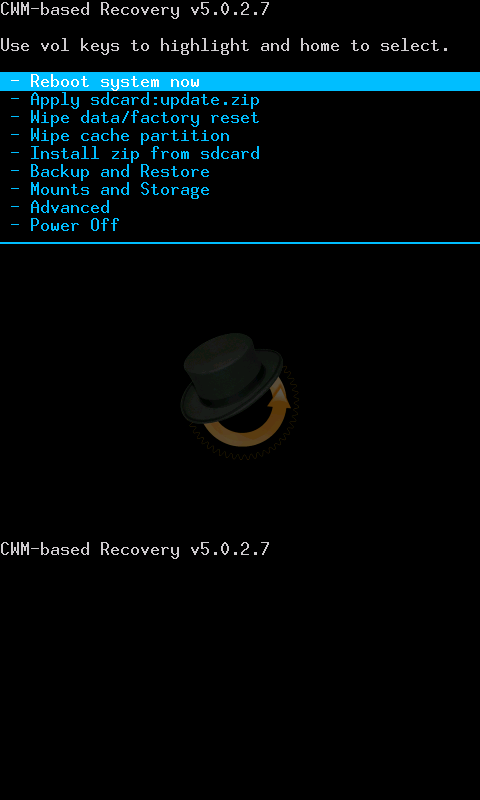
1. CWM Reboot recovery
2. Factory Reset
3. If you are coming from TW+Philz. Clear preload, data and system.You are clean and ready to flash ParanoidAndroid
4. Install PARANOIDANDROID
5. Install GAPPS
6. Wipe CACHE & DALVIK
7. Reboot. DONE.

If you would like to be 100% sure you are clean, once reboot and on PA screen. DO NOT setup your phone yet. Reboot Recovery again.
1. Factory Reset again
2. Clear Cache and Dalvik Again
3. Install PARANOIDANDROID and GAPPS again
4. Wipe CACHE & DALVIK
5. Reboot. FINALE! DONE!

Setup you phone and enjoy... :)


Navigation bar with back light disable :)

**Check out the date and compare with your last downloaded version**

PA list. 
1. pa_n7000-3.60-20JUN2013-073954.zip

HALO activate small pop-up something like Samsung window pop-up.
 HALO before update

HALO after update. NEW. Pause active app... :)

GAPPS List
1. pa_gapps-full-4.2-20130615-signed.zip


How to Install ParanoidAndroid update?
ParanoidAndroid updates DO NOT need a factory reset!

1. Reboot Recovery
2. Install PA
3. Install GAPPS
4. Clear cache and dalvik
5. Reboot. DONE and enjoy the changes/update.


Continue reading here....

Tuesday, December 18, 2012

Download Adobe Adobe Flash Player version 11.1 APK

Are you looking for Adobe Adobe Flash Player version APK? It's been removed from Google Play.

You may download the link below and install it on your device.

1. Android 4.x
2. Android 2.x and 3.x

 No problem opening this adobe setting page on my Jelly Bean 4.1.2....this page required flash.


You should have this after the installation process completed.

Complete Adobe Flash Player Archived. Click here


Saturday, November 10, 2012

How to install Stable Jelly Bean 4.1.2 XXLS7

How to install XXLS7 Stable Version on your Galaxy Note N7000

You need these files in sequence to flash.

1.JB4.1.2_beta.zip: Stock XXLS7. Minimum apps
2.XXLS7-fix-bootanim-signed.zip: Philz kernel
3.Airview_permissions.zip: Fix airview problem
4.Ultimate_N7000_XXLS7_JB_4.1.2_v3.zip: Additional apps

How to Install it?

Note:

  • You have to be ROOTED ICS-ROM or JB-ROM with CWM Recovery and Brickfree kernel installed (Philz / Speedmod / HydraCore)
  • All your apps and data will be gone! We need fresh phone to jump to Jelly Bean (stable version)
  • If you like to take time troubleshoot your ROM, do not format it and ask a lot of questions in XDA. It's your choice :)


Steps to install stable Jelly Bean 4.1.2
1. Copy ROM JB4.1.2_beta.zip to your USB-storage
2. Reboot Recovery (Volume UP+Home+Power Button)
3. Full wipe or Factory Reset
4. Mount and Storage > format/system and format/data and format/preload
5. Flash ROM JB4.1.2_beta.zip. At the end of the process it will reboot automatically
6. Once reboot completed and you are on Jelly Bean. Just skip and don't have to Login to Google
7. Reboot recovery again
7. Flash XXLS7-fix-bootanim-signed.zip (Philz Kernel)
8. If you have Airview problem, flash AirView_permissions.zip via recovery

Adding more apps
DO NOT FULL WIPE. clear cache and dalvik should be enough
9. Flash Ultimate_N7000_XXLS7_JB_4.1.2_v3.zip to get most of the missing apps
DONE!

Continue reading related to stock XXLS7 here

Update:
  • Update to latest PhilZ-cwm6 - Safe Stock Based Kernel v3.1 for XXLS7. 
  • Download Philz XLS7-XJB-3.1 (JB Leak). It will remove superuser and replace with SuperSu
  • If you are having S-Note problem, in the recovery Mount and Storage > Format/Preload
Continue reading related to Philz here

Continue download Google Apps and Samsung Apps...... happy stable Jelly Bean...


Thursday, May 10, 2012

Galaxy Note ICS 4.0.3 Germany N7000XXLPY_N7000OXALPY_DBT.zip

Samsung released their first official Ice Cream Sandwich update for the Galaxy Note GT-N7000. This update runs Android 4.0.3

Download N7000XXLPY_N7000OXALPY_DBT.zip

At the moment only people from Germany with product code DBT could update their phones via Samsung KIES. Below are movies about the first official Ice Cream Sandwich  firmware.

Firmware details:
Galaxy Note GT-N7000
N7000XXLPY 4.0.3 2012 May N7000OXALPY Open Germany

GT-N7000ZBADBT
CODE: N7000XXLPY
CSC: N7000OXALPY
MODEM: N7000XXLPT

Note:
-This is NON WIPE version


How to install it?
If you are from GB+Rooted, you need to have Mobile Odin

1. Download and extract N7000XXLPY_N7000OXALPY_DBT.zip
2. Copy Extracted file to your internal SD card


3. Download CF-Root-SGN_XX_OXA_LPY-v5.3-CWM5.zip
4. Extract CF root until you see the "zImage" file
5. Copy "zImage" file to your internal SD card
6. Open Mobile Odin
7. Select 'Open file' and point to ROM file "N7000XXLPY_N7000OXALPY_N7000XXLPT_HOME.tar.md5"
8. Select Kernel tab and point to "zImage" file

9. Select Ever Root option

10. Select Flash Firmware
Check MD5: YES
11. Sit back and relax....

Finally you will get ICS 4.0.3 + Root + CWM

Note:
- If you face any error after restart, just restart again into recovery and do factory reset
- In case you need to go to recovery mode, DO NOT enter Recovery via CWM apk you will softbricked. 
- Enter recovery via Volume UP+Home+Power button 

Relax....watching the video...this is what you will have :)


more relaxing...


Continue reading on XDA forum and here


Saturday, April 21, 2012

How to install ICS Stunner

How to install ICS Stunner on Galaxy Note N7000?

You are from Gingerbread with root. This is what you need:

1. ICS LP1 Repack I9220LP1-N7000-ICS-REPACK  - Mobile Odin Pro/Mobile Odin Lite.

Open file "I9220LP1-N7000-ICS-REPACK.tar"

2. Once reboot. Clear Data/Factory Reset
 This is CWM or sometime people said Reboot Recovery

3. Advance>Reboot Recovery. Then install ZIP files below
4. ICS Stunner - CWM Recovery
5. LP5 modem - CWM Recovery
6. Done

Note:
-Do not use LP5 repack
-LP6 modem avail on LP5 modem link
-Copy all the download files into your internal SD card 
-No s-pen usage like stock


How to make screen shot on stunner?
Settings >Euphoria Control>Power Menu Options>Check Show screenshot

Hold Power Button and you will see ScreenShot option


ICS Stunner 1.4.19 Screens. Apps
CWM avail.


SuperSU. Means you are rooted!

Widgets


Facebook with Arabic font.


Tuesday, March 27, 2012

How to install N7000DXLC2 via Mobile Odin

Have you download N7000DXLC2? If not download it first.

TODO:

1. Open file... "N7000DXLC2_N7000OLBLC2_N7000DXLC1_HOME.tar.md5" and Verify MD5 on your Mobile Odin

You should see this
And SET this
2. Then click [Flash firmware]
3. Sit back and relax. Lets Mobile ODIN do it's job. DONE
Finally, you should have this.


Note:

-YES. It's NO WIPE!

-ICS Domination v1.1 GONE (WIPE OUT)

-Speedmod K1-5 GONE (WIPE OUT).

-RTL or Arabic Patch GONE

Application Drawer Screens..
 SIM EasyAccess UPDATED. Since I'm moving from Europe Baseband to Malaysia baseband

Deluxe Setting GONE. It's ICS Domination file.


Seems like all apps and data back to stock ODEX. Means I can't load ICS Domination and RTL patch :(
huhuhuhuhu.... have to wait for DXLC2 DEODEX.

Changes:
1. Phone log, Faster Camera, Google+ and browser
2. No shutter sound when silent mode