Showing posts with label How to install. Show all posts

Tuesday, November 25, 2014

How to install CM12 Android L into GT-N7000


How to install CM12 Android L into GT-N7000

  1. Download n7000-CWM-KitKatCompatible.zip OR 
  2. V1.2.1-bauner-kernel-cm-aokp-kitkat-linaro4.9.2-n7000.zip
  3. Download CM12 Alpha 3
  4. Download Android L GAPPS


Steps to install:
  1. Copy Rom + Google Apps + KK Kernel into SDCard
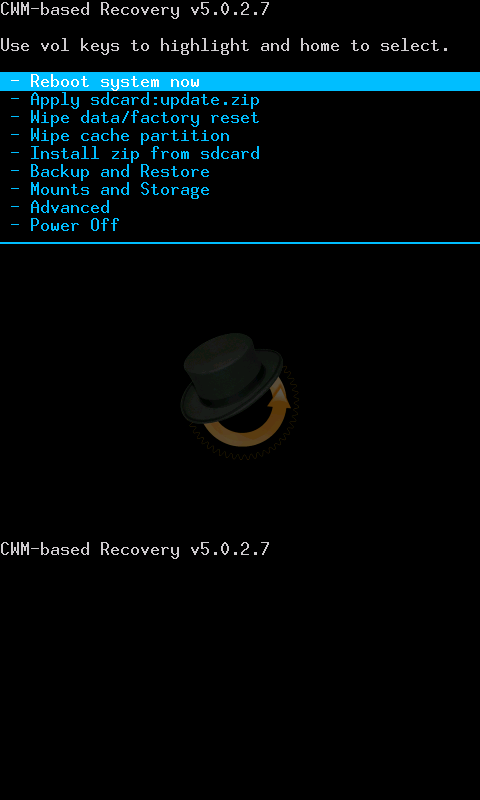
  2. Reboot into recovery
  3. Flash KK Kernel
  4. Reboot recovery
  5. Factory reset
  6. Flash the rom and gapps zip files
  7. Reboot
  8. DONE!


Thanks @bauner XDA developer.

  • CM12 continue reading here
  • Bauner kernel continue reading here


Saturday, April 21, 2012

How to install ICS Stunner

How to install ICS Stunner on Galaxy Note N7000?

You are from Gingerbread with root. This is what you need:

1. ICS LP1 Repack I9220LP1-N7000-ICS-REPACK  - Mobile Odin Pro/Mobile Odin Lite.

Open file "I9220LP1-N7000-ICS-REPACK.tar"

2. Once reboot. Clear Data/Factory Reset
 This is CWM or sometime people said Reboot Recovery

3. Advance>Reboot Recovery. Then install ZIP files below
4. ICS Stunner - CWM Recovery
5. LP5 modem - CWM Recovery
6. Done

Note:
-Do not use LP5 repack
-LP6 modem avail on LP5 modem link
-Copy all the download files into your internal SD card 
-No s-pen usage like stock


How to make screen shot on stunner?
Settings >Euphoria Control>Power Menu Options>Check Show screenshot

Hold Power Button and you will see ScreenShot option


ICS Stunner 1.4.19 Screens. Apps
CWM avail.


SuperSU. Means you are rooted!

Widgets


Facebook with Arabic font.


Friday, January 20, 2012

How to install N7000XXLA4

Would like to install latest ROM for Samsung Galaxy Note? N7000XXLA4 / XXLA4

Download N7000XXLA4 here

Once you download it, there are two files inside
1. N7000XXLA4_N7000OXALA4_N7000XXLA4_HOME.tar.md5
2. SS_DL.dll (Flash via ODIN Ignore this file)

Have CRC problem? This is what I did. Using IZArc I convert the "zip" file to "7z" file format.


Unzip "N7000XXLA4_N7000OXALA4_DBT.7z". You should be able to extract it :)

How to install it?

1. Run ODIN
2. Select TAR/MD5 file. See image below


3. Just fill in PDA. The rest leave it blank.... Connect your phone to PC and waits for COM Port connection.
4. Click [Start] button. Sit back and relax.
5. Once restart. Remove USB cable. DONE

Good News. It's a NO WIPE version. Your phone data and configuration just like before flashing it. No data or application restore required.

Get UPDATED!...


If you already rooted and would like to upgrade to LA4. Download CF-Root-SGN_XX_OXA_LA4-v5.0-CWM5.zip here. You need to flash it via Mobile Odin.


Continue reading CF-ROOT for Galaxy Note here


Thursday, December 29, 2011

How to install Rocket ROM v12 XXKL7

Finally we have a stable and fast custom ROM


Download Rocket ROM v12 here

Changelog ROCKET ROM-V12-KL7

  • Based on official XXKL7 Firmware + Modem KL7
  • DEODEX, zipaligned and rooted
  • Added Multi-CSC
  • Android Version 2.3.6
  • FM-Kernel 1.5
  • Market fixed (purchasing apps / local apps showing up!)
  • Themed as usual with minor modifications
  • Added 1% battery steps
  • Added CRT-OFF
  • Added Extended Powermenu (3 more options: Reboot, Recovery, Download)
  • Added '14 Toggle Status Bar' (individual modifications can be made in App 'Quickpanelsettings' )
  • Some tweaks from pikachu01 (libs + bins from Android 4.0 and some others)
  • Lots of other tweaks + scripts for faster performance, smoother scrolling, better RAM handling
  • Transparent Sammy Weather Widget
  • Automatic zipalign of all system apps on every reboot
  • SIP VoIP Support for Wifi + Data
  • Sony Bravia Mod for better graphic quality (might be nonsense but doesn't harm anything )
  • Build in transition animations in framework
IMPORTANT: 
  • Reboot your device twice after flashing ROM!!! (If you are facing bootloop. Just press power button and OFF it)
  • Still bootloop. Clear cache/dalvik and reset factory
  • If you face issue with Gmail not updating in market, delete gmail.apk in /system/app, reboot and then download new gmail from market
TODO
1. Downgrade to previous version. N7000XXKL3
2. ROOT+CWM N7000XXKL3
3. Flash Rocket v12 from recovery. Wipe cache/dalvik

Note:
In progress of downgrading, root+cwm :) DONE


Continue reading here


Thursday, October 06, 2011

How to install 2.3.5 I9000XXJVT

I will show you how to install I9000XXJVT

1. Download I9000XXJVT and extract the ZIP file
2. Download ODIN
3. Get your phone in download mode (Power+Volume Down+Home button)

4. Run ODIN
5. Put in all the extracted files as shown in the image (click on the image to enlarge).
  • PIT=s1_odin_20100512.pit
  • PDA=CODE_I9000XXJVT_CL617736_REV03_user_low_ship.tar.md5
  • PHONE=MODEM_I9000XXJVT_REV_00_CL1064602.tar.md5
  • CSC=GT-I9000-CSC-MULTI-OXAJVT.tar.md5
Note: Checked re-partition. All your apps will be deleted. Your data files still on the SD Card.
6. Connect your phone to USB cable. Click START button. Sit back and relax :)
DONE.
This is what you should have.
I'm going to continue testing and will post the screens after the break....

Note: Good practise. Factory reset once done. This will make your phone as new coming out from factory :) Useful for ROOTING process later.